
Inspect your HTTP traffic painlessly
A local debug proxy, free and lightweight. Capture, filter and analyze tens of thousands of requests with a UI that never freezes.
What's inside
MITM on 127.0.0.1:8888
Local proxy with end-to-end TLS rewrite using a CA generated on your machine.
System proxy toggle
Turn the macOS and Windows proxy on and off in one click. No manual config.
Self-signed root CA
Guided generation and install. You decide when to trust — and when to revoke.
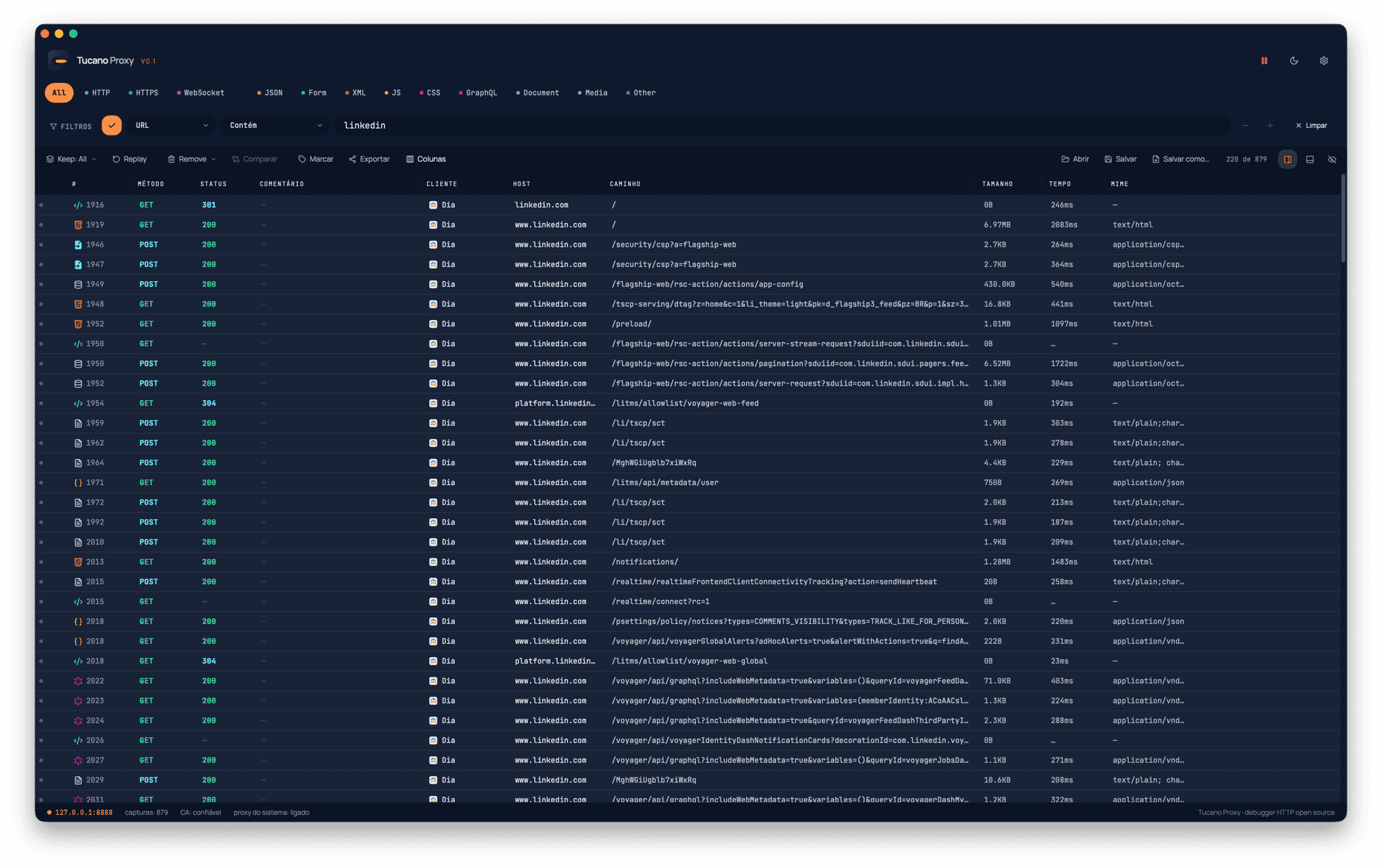
Virtualized flow list
Handles tens of thousands of requests without lag. Smooth scroll end to end.
Filter DSL
Powerful filters like host:api.foo.com status:>=400 method:POST. Combine, invert, save.
.tucano sessions
Saved as SQLite. Share with your team, reopen later, never lose a thing.
Inside the app
Real screenshots — not mockups.
Performance, lightness, and purpose
Designed to be fast on any machine, written in Rust + Tauri, with a minimalist design and built with care to help the community.
Truly performant
Virtualized list, parsing on a separate thread, zero-copy where possible. Handles thousands of requests without freezing the UI.
Rust + Tauri
Proxy core written in Rust — memory-safe, no GC, small binary. Native UI via Tauri 2.
Minimalist design
Every pixel thought to disappear under the content. Purposeful color, generous typography, no fluff.
Built for the community
MIT open source, no telemetry, no license, no paywall. Designed with care for people who build software.
LLM-ready Markdown export
One click and Tucano generates clean Markdown with a customizable prompt and structured steps — paste it straight into Claude, GPT or any agent helping you debug.
- Custom prompt + target language. Pick C#, TypeScript, Python, Go, Java or free-form — the default prompt nudges the model to follow your repo's existing pattern.
- Structured steps with placeholders. Sensitive headers redacted, cross-step placeholders ({var1}, {var2}) and locator hints (XPath/JSON-path) for extraction.
- Copy or save as .md. Copy to clipboard or save as tucano.llm.md. Plain text, ready to drop into the chat.
# Tucano — Fluxo HTTP capturado

> Você é um engenheiro de software experiente em TypeScript (fetch).
> Antes de gerar código, inspecione o repositório e siga o padrão
> usado para chamadas HTTP — não invente uma estrutura nova.

## Contexto
- Total de chamadas: 2
- Hosts: auth.example.com, api.example.com
- Linguagem-alvo: TypeScript (fetch)
- Headers sensíveis mascarados: sim

## Steps (estruturado)

### 1. POST https://auth.example.com/login → 200 (124 ms)
| header | value |
| ------ | ----- |
| content-type | application/json |
| authorization | ***REDACTED*** |

### 2. GET https://api.example.com/me → 200 (88 ms)
| header | value |
| ------ | ----- |
| authorization | Bearer {var1} <!-- from: step1 + locator: $.token -->Tucano inside your agent
The tucano-mcp package exposes captured flows over the Model Context Protocol — plug it into Claude Desktop, Claude Code, Cursor or any MCP client and let the agent inspect, replay and compose requests.
Client configuration
{
  "mcpServers": {
    "tucano": {
      "command": "npx",
      "args": ["-y", "tucano-mcp"],
      "env": {
        "TUCANO_TOKEN": "paste-the-token-from-tucano-settings"
      }
    }
  }
}
Grab the token from Settings → MCP inside the app.
Exposed tools
tucano_statusBridge + proxy status, flow count. No params.
tucano_list_flowsList captured flow summaries (no bodies). Params: limit (1–1000), host, method, status, q, since (epoch-ms for incremental polling).
tucano_get_flowFull flow record including bodies. Params: id.
tucano_get_request_bodyDecoded request body (utf8 or base64). Params: id.
tucano_get_response_bodyDecoded response body (utf8 or base64). Params: id.
tucano_replay_flowRe-dispatch a flow with optional header/body overrides; creates a new flow. Params: id, headers (replaces all if given), body.
tucano_compose_requestSend a brand-new request through Tucano. Params: method, url (full URL), headers, body, log (default true — set false to run without persisting).
tucano_delete_flowsDelete flows by id. Params: ids (array).
tucano_clear_flowsWipe all captured flows — useful to set a clean baseline before an automation. No params.
tucano_start_captureStart the local proxy and flip the OS system proxy so traffic flows through Tucano. Params: port (optional, defaults to current Tucano port, usually 8888).
tucano_stop_captureTurn the OS system proxy off and stop the local proxy server. No params.
tucano_export_as_curlRender one or more flows as ready-to-run curl commands — handoff for dev/Claude Code to reimplement. Params: ids, includeHeaders (default true, includes cookies/auth).
tucano_export_as_codeRender flows as code snippets. Params: ids, lang (fetch | axios | python, default fetch). Smaller language set than the full LLM export.
Ready to start?
Pick the installer for your system.
FAQ
Do I need to install a certificate?+
Yes, to inspect HTTPS. Tucano generates a local CA and guides the install. You can revoke anytime.
Does it work offline?+
Yes. The proxy runs 100% locally and ships no data anywhere.
How does it compare to Fiddler or Proxyman?+
Same idea, focused on speed, simplicity, and being open source. No license, no telemetry.
Is there a Linux build?+
Yes — AppImage and .deb are available on the download page.
Can I contribute?+
Please do! Open an issue or PR on GitHub.